Every AI agent that works on palStack starts the same way: knowing nothing. It doesn't remember yesterday. It doesn't know that pantryPal's production port moved, or that finPal has two editions, or that a fix merged last week was never actually deployed. And palStack isn't small anymore. It's several products, each with a free self-hosted edition and a hosted premium one, mobile apps, a shared AI service, demo copies of everything for testers, and a growing list of team tools, spread across nine repositories.
For a while the answer was "the agent reads the code until it figures it out." That works, slowly, and it fails in the worst way: confidently. This post is about what we built instead, a map called brainPal and a team wiki called Docmost, and the infrastructure move that made both of them necessary.
Everything moved to one machine
At the end of September we moved every palStack product off our old server and onto a newer machine we call llm, because it's also where our language models run. Production for clubPal, propertyPal, pantryPal and finPal, the admin app, the palStack homepage, and the shared AI service all live there now, next to the demo stacks testers use. The public addresses didn't change. Cloudflare sits in front of everything, so nothing on the box is directly exposed to the internet, and switching it over was a matter of pointing the routes at the new machine.
We moved the exact builds that were running, not the newest ones. That turned up something I'm still thinking about. For most of our images, the registry had a newer version than what was actually in production. Code had been merged and never deployed. Nobody had lied about anything. There's simply no automatic pipeline here: a deploy is always a deliberate step, and some of those steps had never happened. "Merged" and "live" had quietly become two different things, and nothing was keeping track of the difference.
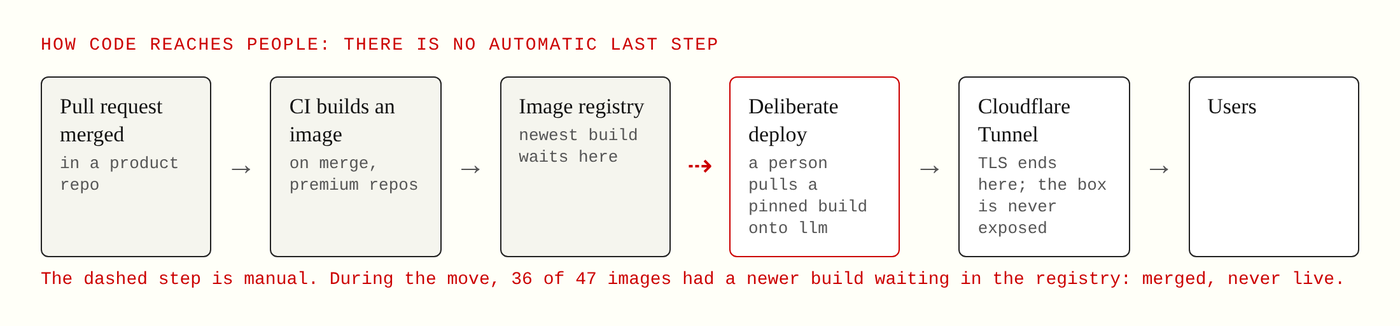
The last step before production is always a person. That gap is where 36 of 47 images were waiting.
The same week, the team tools moved over too. Docmost, an open-source wiki, became our team's shared notebook. Alongside it went Plane for tasks, a password vault, error tracking, privacy-friendly analytics and a shared support inbox. That was a lot of moving pieces landing at once, which is exactly when an agent that knows nothing becomes dangerous.
What brainPal is
brainPal is a map of the entire palStack ecosystem. Every product, every edition, every module, every service, every deploy, every outside service we depend on, and every document we've written, drawn as one graph you can explore. Click on finPal and you see its editions, its modules, the services it runs, what it depends on, and its full documentation in a side panel. Hover over a node and everything not connected to it fades away. It exists so anyone, person or model, can answer "how does this relate to that?" without digging through nine repos.
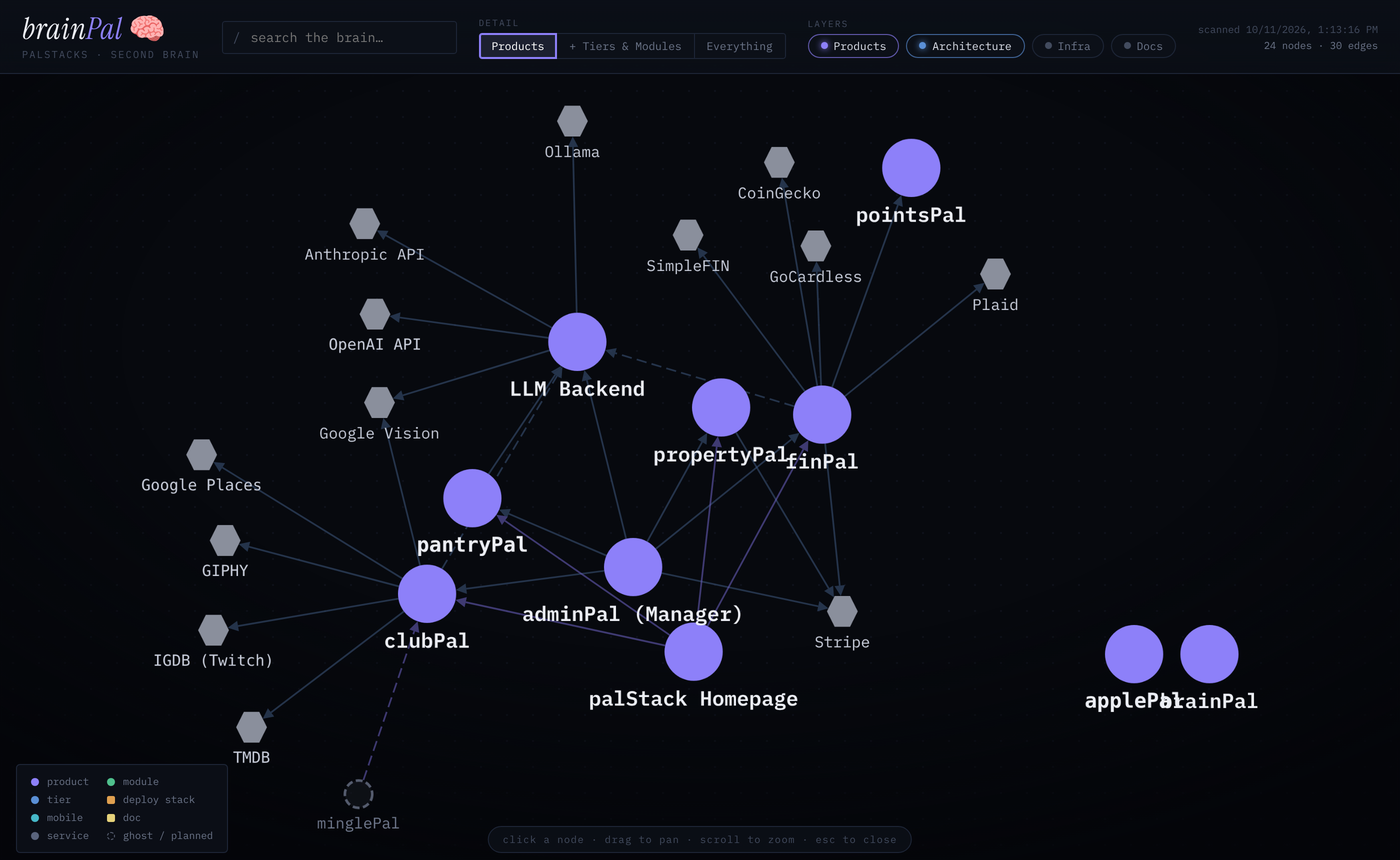
brainPal at the product level, with the infrastructure and docs layers switched off. Purple circles are products, grey hexagons are outside services.
The interesting part is how it stays honest. Half of brainPal is generated. A scanner walks the whole codebase and reads the facts that are already written down somewhere precise: which services each product runs, how they connect, which ports they use, which modules exist. The scanner reads names and ports only. It never reads a password or a secret, so nothing sensitive ends up in the map. The other half is written by hand: what state each product is in, a one-line description, the outside services like Stripe and Plaid, products we've retired, and the relationships code can't see, like which product's AI calls go where. The two halves get merged, and where they disagree, the hand-written note wins, because a person put it there on purpose.
Even so, brainPal stays on our private network. A map of your whole architecture is useful to an attacker too, even with no secrets in it.
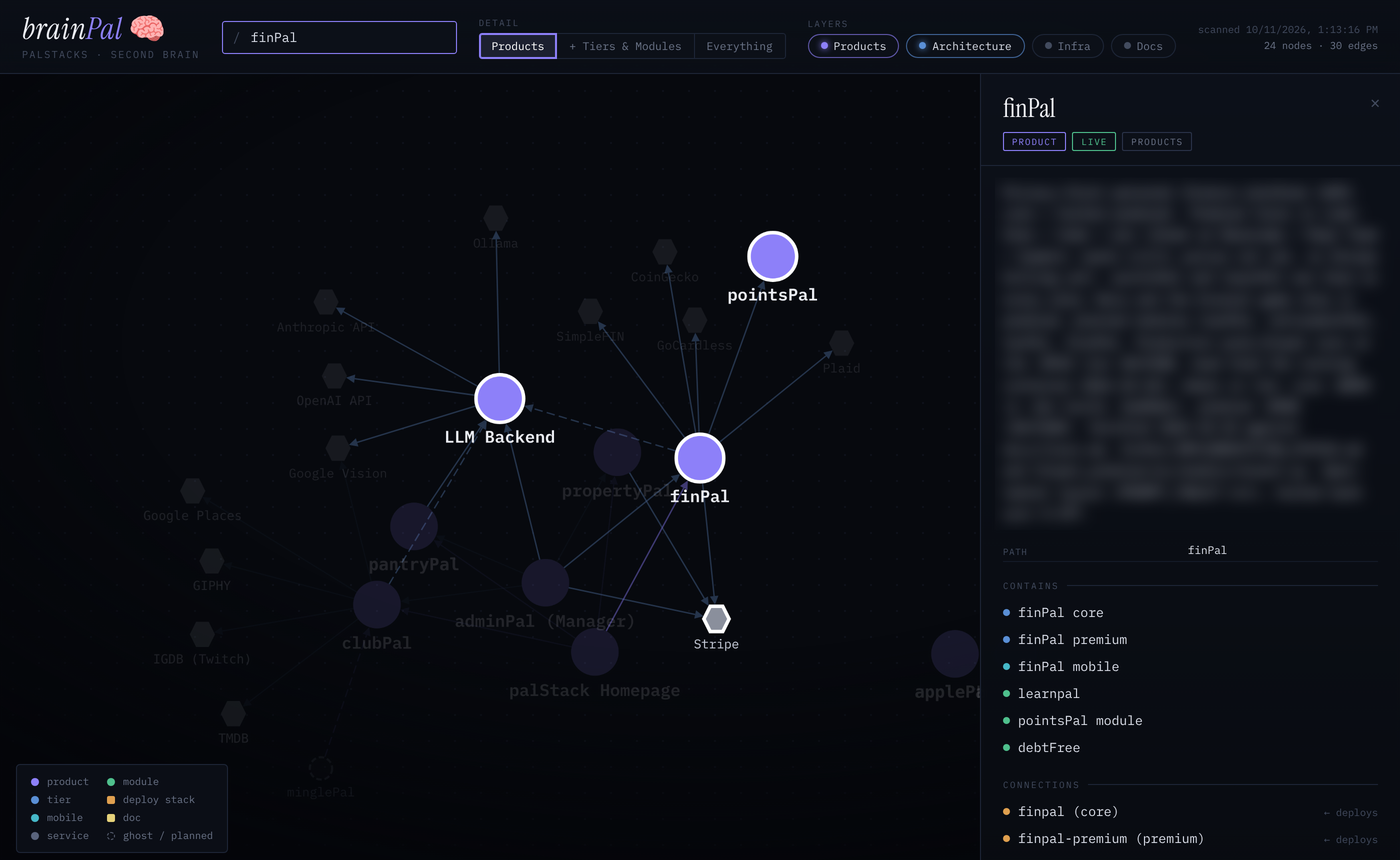
Clicking a product lights up its connections and opens its panel. I blurred the description, because it lists internal addresses.
A map for people, text for agents
The graph is for humans. An agent works from text, so every time brainPal scans, it also writes plain files from the same data. There's one short file listing every product on a single line. There's one file per product with its status, its editions, its modules, what it depends on, the traps that have bitten us before, and, most importantly, the list of files to read next, in order. And there's an index in the llms.txt format, a simple convention for telling a language model where the useful text on a site is.
We use several AI tools, and each one looks for instructions in a different place. Claude Code reads a file called CLAUDE.md. Codex and Copilot read AGENTS.md. Gemini reads GEMINI.md, which just points at AGENTS.md. All of them now say the same thing first: before working on a product, read its brainPal context. A chat window that can't reach our network gets a different version, a single "briefing pack" per product that a person can paste in, with the context and the roadmap in one file.
Every one of those files carries the same warning at the top. This is a map, not proof. If it disagrees with the code, the code wins, say so, and fix the map. I learned to write that sentence the hard way. An agent that trusts its notes more than what's in front of it is worse than one with no notes at all.
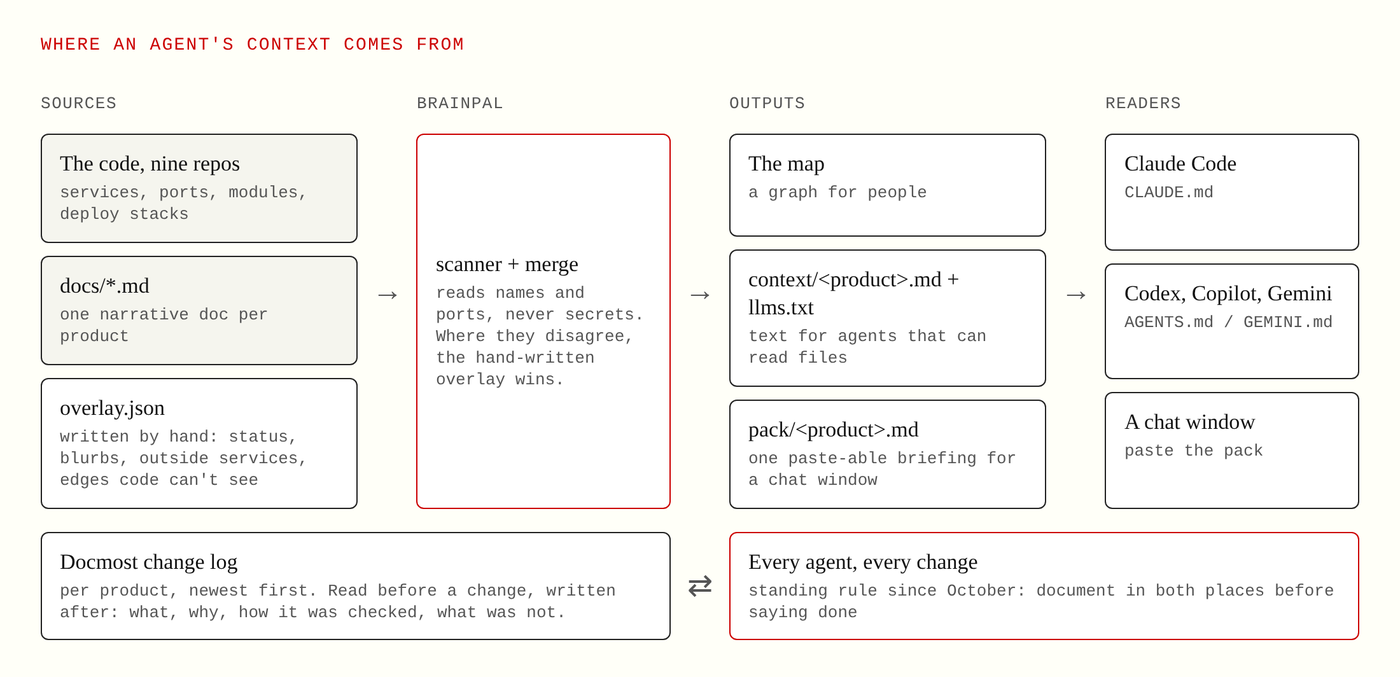
Where an agent's context comes from, and the change log loop every agent closes.
Docmost is the team's memory
brainPal answers "what is this and how does it fit." It doesn't answer "what changed on Tuesday and why." That's Docmost's job. Every product has its own space in the wiki, and every space has a change log page, newest entry on top.
In October we made it a standing rule: any change to anything we run gets documented in both places before anyone says it's done. That covers product code, a mobile app, a deploy, a demo, an agent skill, the servers themselves. A small change gets a Docmost entry, one paragraph covering what changed, why, where the code is, how it was checked, and what was not checked. That last part matters most. A change log that only lists successes teaches the next reader to trust things that were never verified. A bigger change, like a new module, a new service or a new price, also updates the hand-written half of brainPal, rescans it and redeploys the live map.
So the agents read Docmost too. A product's change log is one of the first things an agent opens before changing anything, and it adds an entry when it's done. To make that possible, agents sign in to the wiki through a dedicated bot account. It can create and edit pages and move them to the trash, but it can't permanently delete anything. The community edition of Docmost doesn't offer API keys, so the bot signs in like any team member would, with a password kept in a locked-down file on my Mac, never in a chat or a repository.
The structure that works for us
None of this would hold together without a predictable layout, so every product is shaped the same way. At the top of the workspace sit a few files every agent reads first: the rules that apply to every change, the same brief written for agents that aren't Claude, an operating manual, and one roadmap ranked by what's worth doing. Next to them are brainPal, a docs folder with one narrative document per product, the research folder with its graded evidence, and a folder of skills, which are written runbooks an agent can follow for things like verifying a change, deploying, or publishing to the wiki.
Inside each product the pattern repeats. It has its own rules file and its own roadmap, which is the single source of truth for what's done and what's next. The free self-hosted edition and the hosted premium edition live side by side, with the mobile app next to them. Design work follows the same order everywhere: a spec first, then a plan, then the build. A product's voice rules and its evidence file live in the product, not in someone's head. The team wiki and the task tracker sit outside the repo, on the server, because people who never open the code need them too.
The point of all that sameness is that an agent who has worked on one pal already knows where to look in the next one.
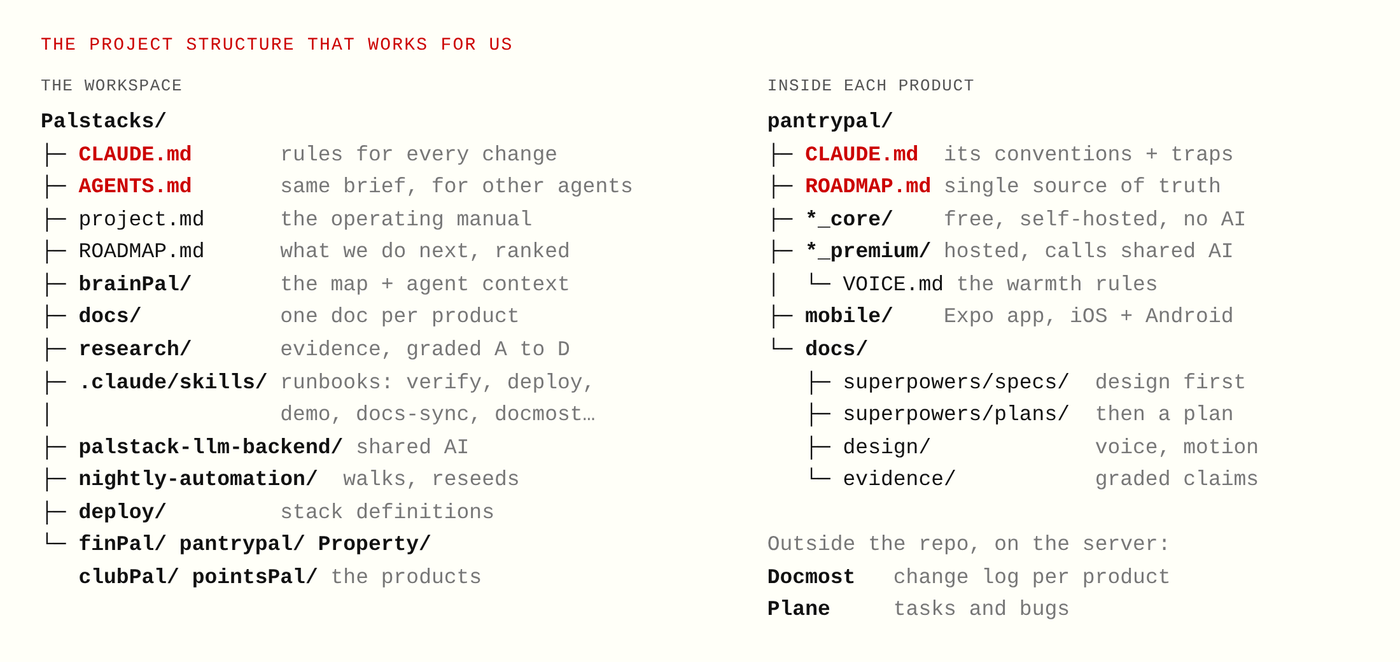
The workspace on the left, one product on the right. Every product follows the same shape.
The loop, put together
When an agent picks up a palStack task now, the order is the same every time. It reads the standing rules and the operating manual. It reads the product's brainPal context, which tells it what the product is, where everything lives and which traps to avoid. It reads the product's Docmost change log to see what happened recently. It does the work and verifies it with the product's own checks. Then it writes back: a change log entry in Docmost, updates to the repo docs, and for a big change, the brainPal map.
Each agent still starts from nothing. But it starts from nothing next to a map and a diary that every previous agent helped write, and that has made a real difference. The questions they ask are better, the mistakes are smaller, and when something does go wrong, there's a written record of what was and wasn't checked.
What I'm still working on
The weakest link is the same one the server move exposed: anything that depends on someone remembering a step. Keeping brainPal fresh is still a ritual, not an automatic process, and a map that's a week out of date is quietly misleading. The next step is making the rescan and the redeploy happen on their own after a change lands, so the map can't drift away from the code without anyone noticing.