Before we added a single animation to propertyPal, I had a script record every page and measure what was actually moving. The answer was almost nothing. Two soft shapes drifted around in the background on every page, and that was it. Opening a property swapped the whole screen in one frame. The notifications menu appeared instantly and vanished instantly. On a phone, a loading spinner flashed for a tenth of a second on most pages, too fast to read and just long enough to feel jittery.
The app wasn't broken. It just felt like a set of documents instead of something alive. And the measurement turned up something more useful than "it needs animation": a lot of pages jumped while they loaded.
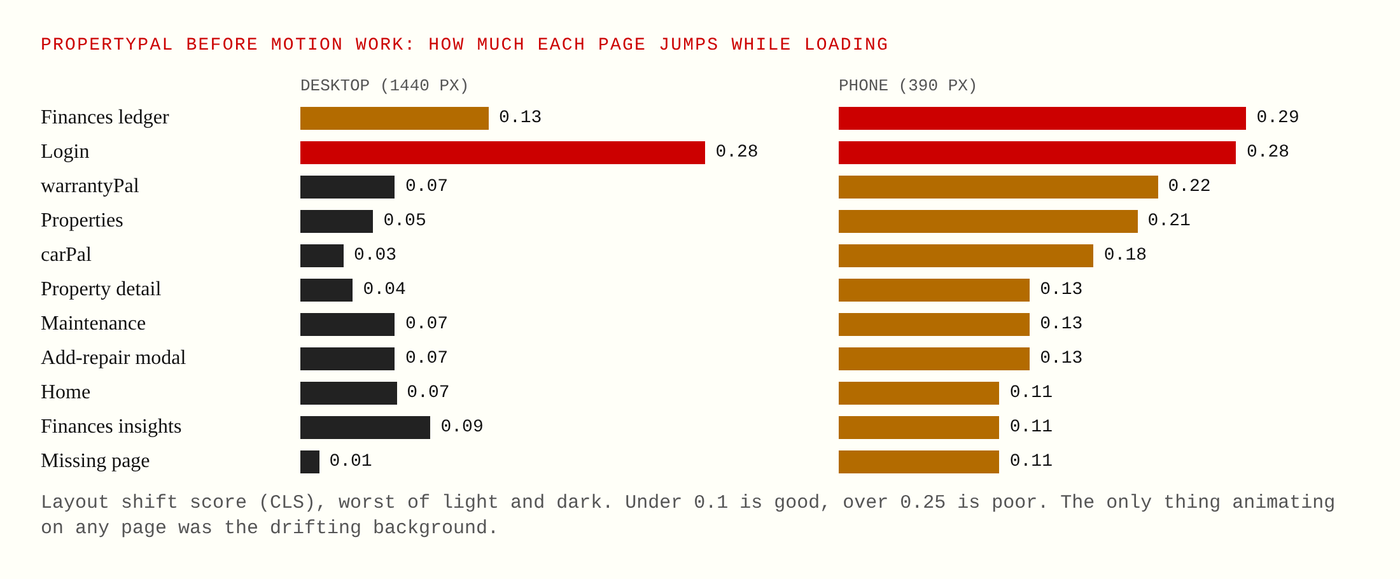
The audit, before any motion work. Layout shift measures how much a page jumps as it loads. Phones had it worse almost everywhere.
Measure before you move
Layout shift is a score browsers can report for how much a page's content jumps around after it first appears. Under 0.1 is considered good, and over 0.25 is poor. propertyPal's login page scored 0.28 at every screen size, because it first showed a plain sign-in form and then swapped it for a different layout a moment later. The finances ledger on a phone was 0.29. Most pages on a phone sat between 0.11 and 0.22.
That changed what "adding motion" meant. Motion on top of a page that jumps just makes the jump fancier. So the first fixes on the list aren't animations at all: reserve the space before content arrives, delay spinners so they never flash if loading takes less than a moment, and give the missing page a real page instead of silently sending you home. Only then do the moves go on.
One kit, eleven moves
clubPal got its motion first, because a group app has the most moments worth celebrating. Instead of animating each screen by hand, we built a kit: a small set of named moves, each with one job, all reading their timings from a single file of tokens shared by the website and the mobile app.
Rise is how lists and cards arrive, settling in one after another, at most six in a row so nothing waits too long. Lift is the small tilt toward your finger or pointer when you press a card. Sheet is how a panel rises up from behind the page. Flip turns a card over to its done side when you RSVP, vote, claim something from the bring list or settle up. Pop springs avatars and new options into place. Fill grows a bar or a ring to its value. Shuffle fans out activity ideas and lands on one when you ask the app to pick. Send folds a note up and flies it away. Count ticks a number up. Celebrate is the gold shine and one burst of paper confetti for big milestones. And Open, the newest, is an envelope that opens for party invites.
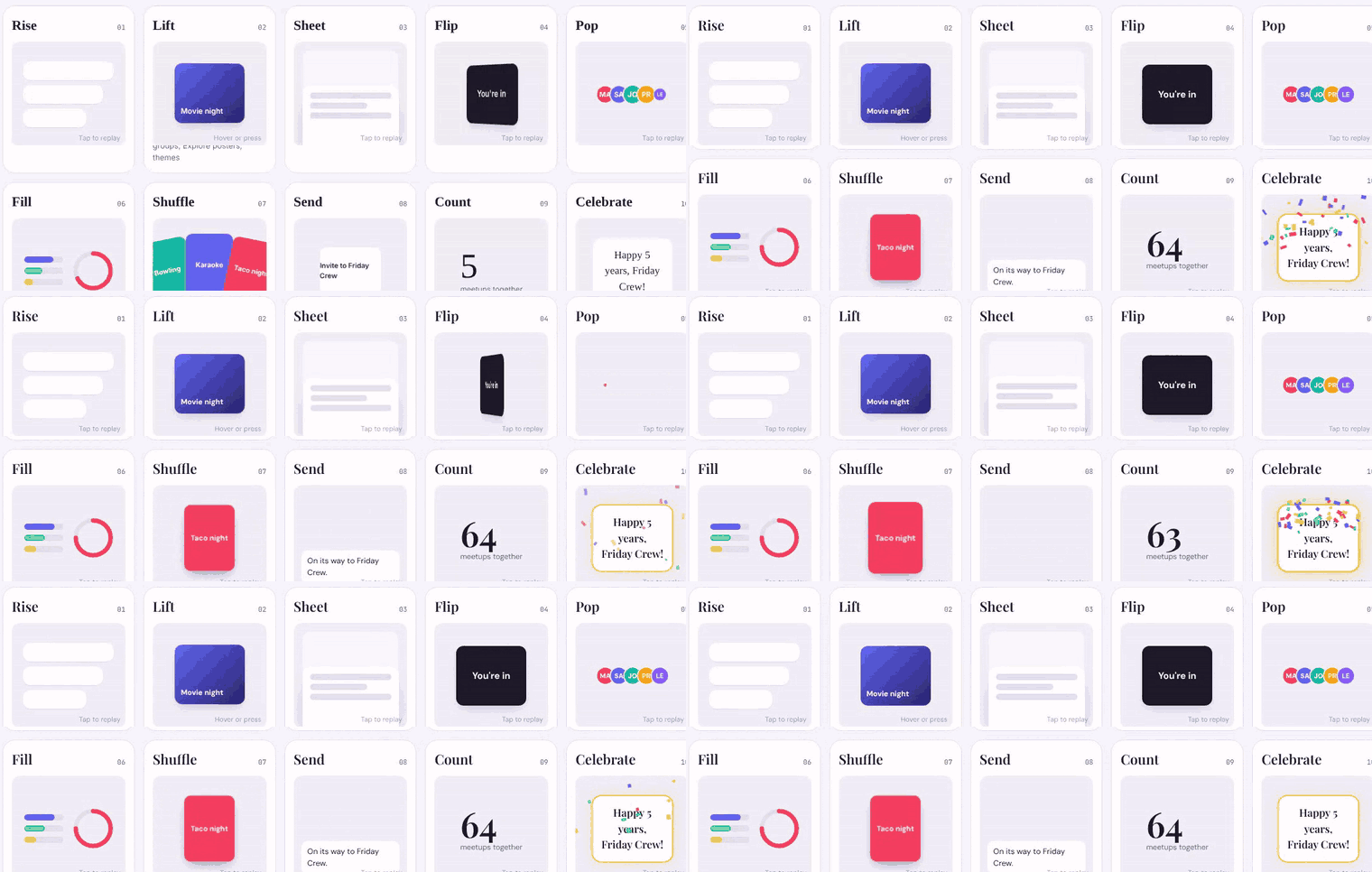
The kit's reference page playing every move at once.
The tokens are short enough to fit on a card. A fast move takes 150 milliseconds, a normal one 250, a slow one 400, and a celebration two seconds. Nothing ever blocks a tap, there's no sound, and the deepest tilt is six degrees. We also wrote our own confetti and removed both of the libraries the apps had been using, so the one celebration looks the same everywhere and respects the same settings.
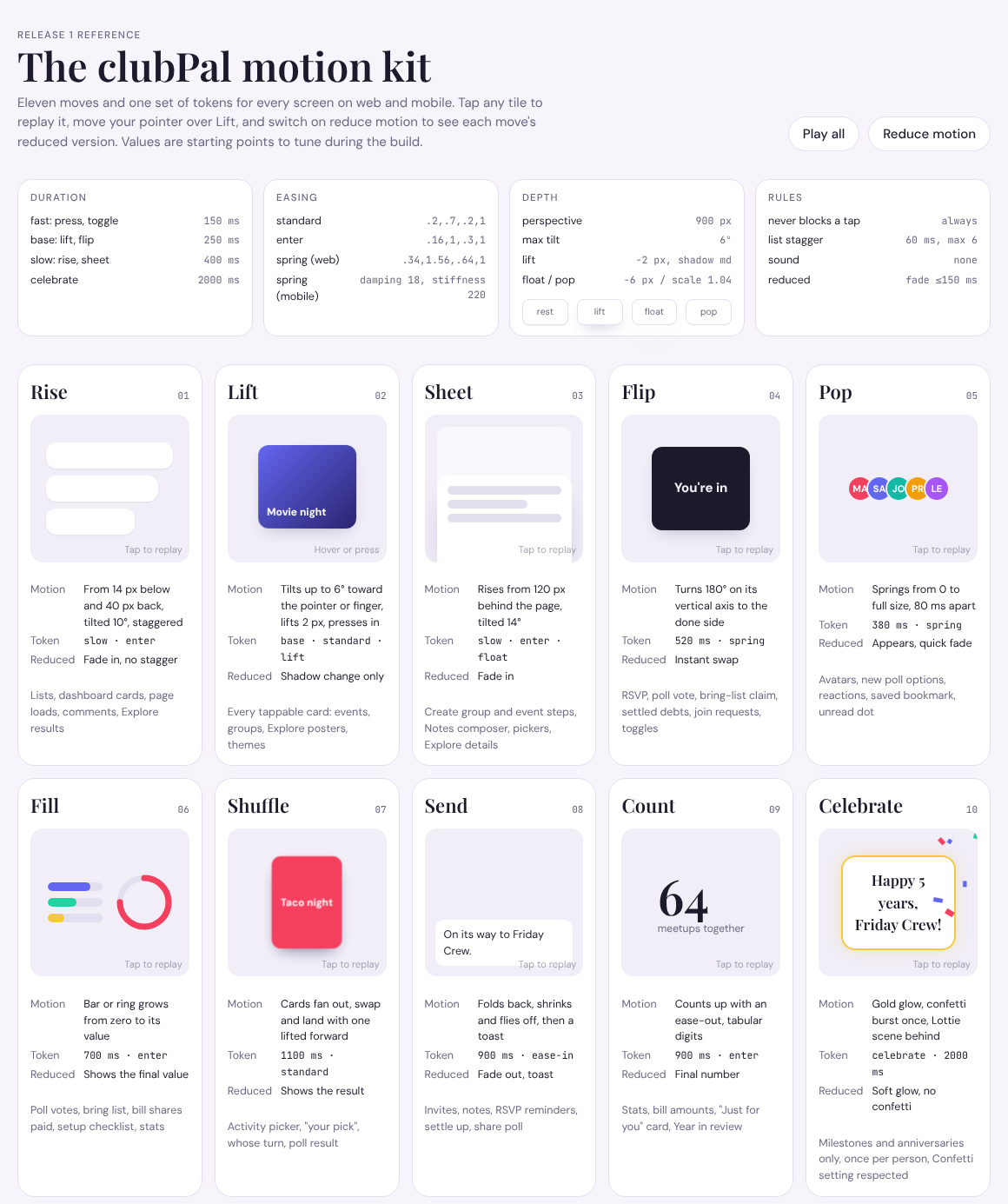
The reference page. Each card says what the move does, which tokens it uses, its reduced version, and where it's allowed.
The calm version is not optional
Some people get dizzy or distracted by movement on a screen, and phones and browsers have a setting called reduce motion for them. The easy thing is to switch animations off when that setting is on and call it done. We decided every move ships with its own reduced version, designed on purpose. A flip becomes an instant swap. A filling bar shows its final value. A celebration keeps a soft glow and drops the confetti. Nothing is lost, only the movement.
The rules behind that are stricter than they sound. The app reads one switch: your choice in the app's settings if you've made one, in either direction, and otherwise your phone or browser setting. Every animation has to end in the same state the screen would show without it, so skipping it can never leave something half-hidden. Nothing waits on a delay. Nothing moves for more than five seconds on its own. And no information is ever carried by motion alone.
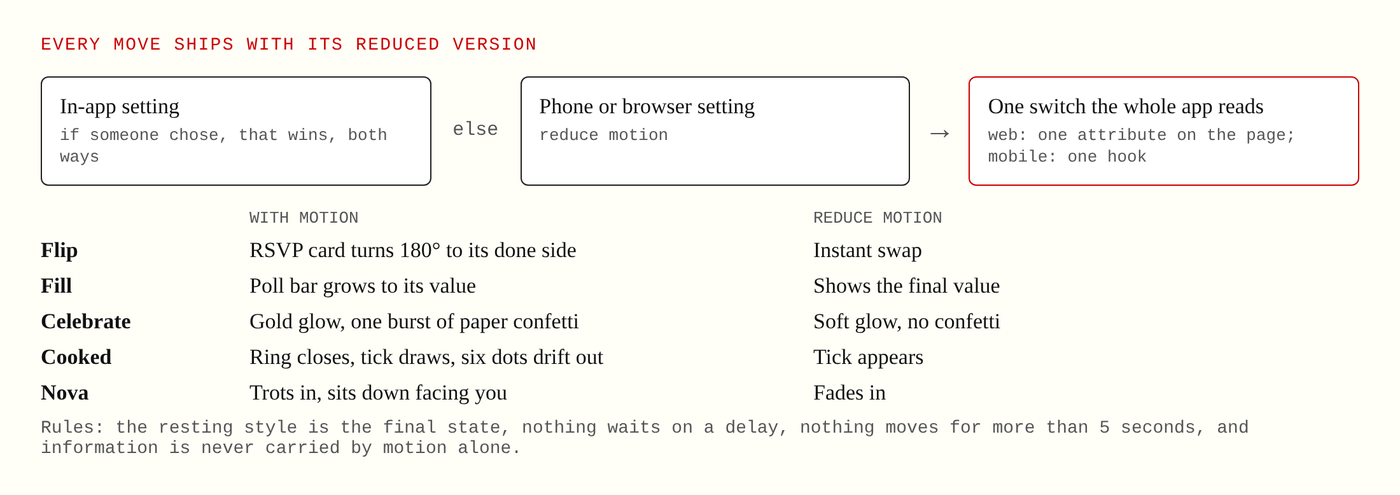
One switch decides, and every move has a calm version that keeps the information.
clubPal now has a Reduce motion switch in its settings, right next to the Confetti switch. Turn it on and depth and movement become a gentle fade, nothing flies or tilts, and the small vibration you feel when you answer or send something turns off too.
pantryPal: only the wins move
pantryPal got the same approach with one extra rule, which came from the food-waste research. Its animations reward something you just did: adding an item, marking a meal as cooked, planning a meal into a day, using something before it went off. Each takes under a second of real movement and plays once. There are no streaks, no scores, and no goal a household can fail.
That rule cost us a moment I liked. The first plan had a celebration for "a whole week with nothing wasted." Then I read the research again and realized most households would never see it, and the ones who missed it would feel judged by an animation. It became "used in time," a small chip that pops onto a single item's card. Nobody can fail at that. The one looping animation, a little jar with steam on an empty pantry, stops after five seconds, which is also what accessibility guidelines ask for.
What the walks caught
Every move was checked the same way we check everything else: automated walks that open each page at phone and desktop sizes, in light and dark mode, with motion on and with it reduced. clubPal's web walk ran more than 1,400 checks each time. The walks found real bugs a quick look would have missed. A counting animation on mobile crashed outright. RSVP pills that were supposed to flip never turned, because the component was being rebuilt on every render, so the flip reset itself before it could finish. One page never loaded at all. And several pages scrolled sideways on a narrow phone.
There's also a check that runs before every mobile build and compares the app's timing tokens with the website's, so the two can't quietly drift apart.
What's next
propertyPal is next, and it gets the kits the other pals already proved, starting with the fixes the audit found. The mascots come after that, each pal's dog moving under the same rules, with the same calm version for anyone who'd rather they just appear. Motion, it turns out, is mostly a question of restraint. The moves that matter are the small ones that say "nicely done" and then get out of your way.